Month-end closing: finalising your settlement with the host
The end of the month. Your host sends you a statement, or you provide one yourself. Rent, commission, the salon’s products, card fees, tips, BTW - it all comes together. This is how you close that month calmly, transparently and accurately, with an overview you both stand behind.
Month-end closing is the moment your separate working days become one settlement with your host. The goal isn’t just “paying what you owe”, but something more valuable: a settlement that can be checked, that both parties stand behind, and that at the same time forms your own records as a self-employed professional. A settlement you can back up item by item is also helpful with the Dutch Tax Administration (Belastingdienst) - it shows that you run your business independently and carefully.
What you need to know about the settlement conceptually is in the settlement explained. This page shows the steps.
The flow consists of a few clear steps. You can do the first two with any version of ZumFlo; the AI comparison and the Moneybird connection are part of Pro.
Step 1
Review your monthly overview
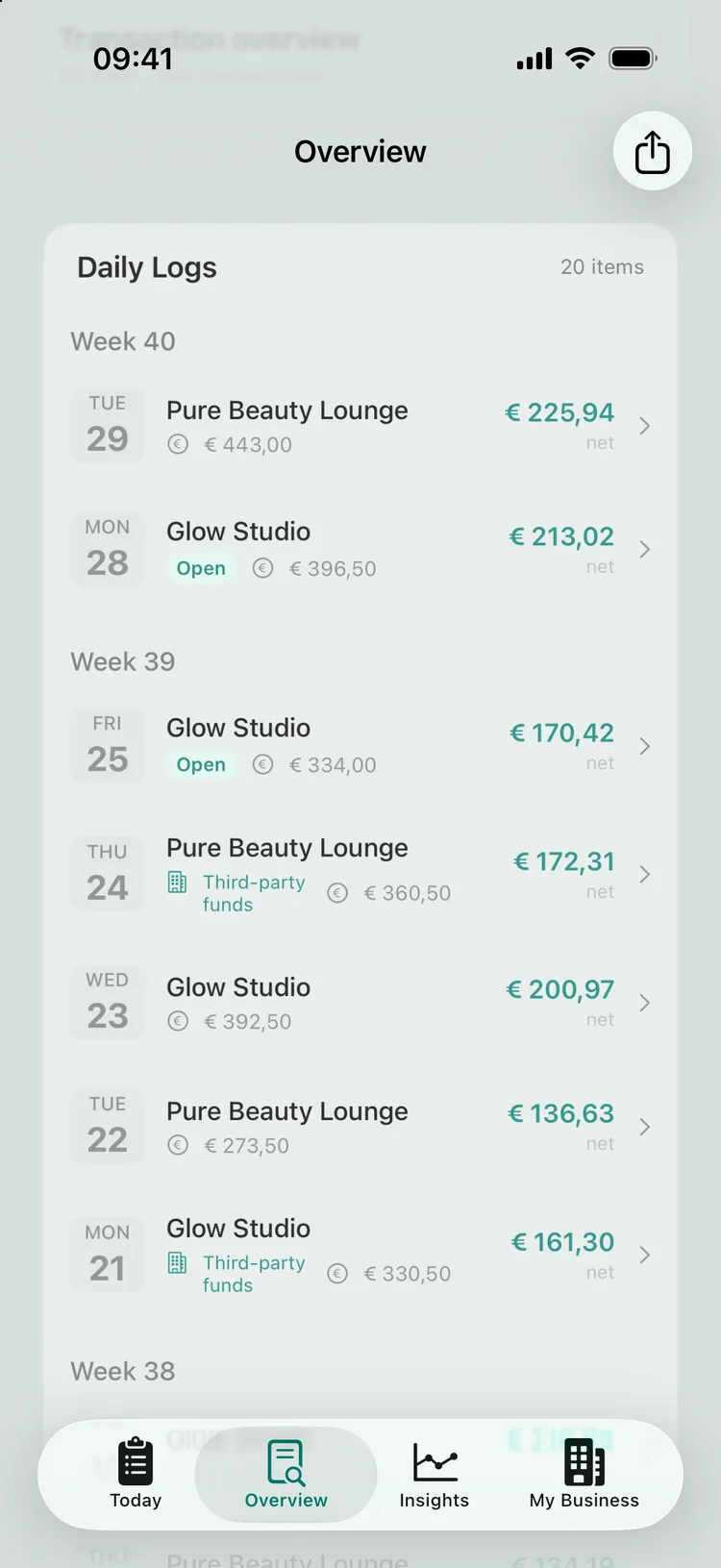
Open the Overview tab and pick the month you want to close. For each location you see the result built up from all your daily logs: your revenue, what goes to your host and what you keep net. This is the moment to check that all your working days are in and nothing is missing. If you work with several hosts, you close each location separately.
Check that your daily logs are finalised. The Daily Logs card on the Overview screen shows all your working days for the month. Check that they are not only filled in, but actually finalised: a finalised day has no label, while a day that isn’t finished yet carries the “Open” label. A daily log that is still open hasn’t been fully processed and doesn’t count properly in your monthly total yet. Finalise open days first - then you compare and settle on complete figures.
Before closing, check that no day is still “open”.
Step 2
Generate your specification and share it with your host
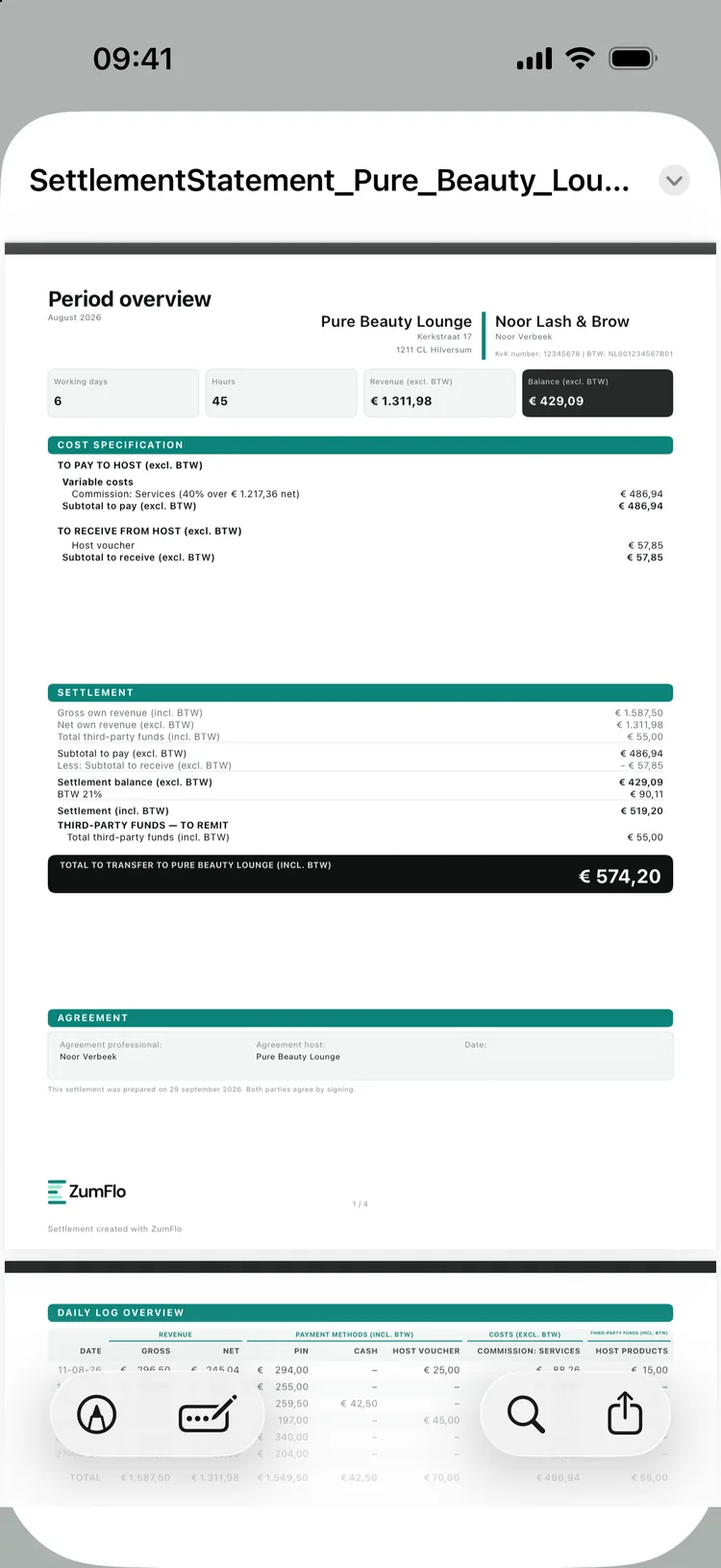
From your daily logs ZumFlo automatically builds a period overview: your specification for that month, per location. It shows day by day what you did and how the settlement is built up - including the things that go outside the salon’s own system and that only you can see: cash, gift vouchers, non-standard treatments.
Why you share it: it gives your host the full context, so the settlement can be followed item by item. Not out of distrust, but as a respectful basis - two sets of records that match up instead of one. Your host benefits too: less digging, an overview that is complete and traceable, and nothing to install - the host simply receives the PDF, ready to go through together.
ZumFlo builds your specification automatically from your daily logs.
Step 3 PRO
Compare with the host’s specification
Ask your host for their specification of the month - often an export or overview from the salon’s system. Once you have it, you can put your two sets of records side by side, automatically. Here’s how it works:
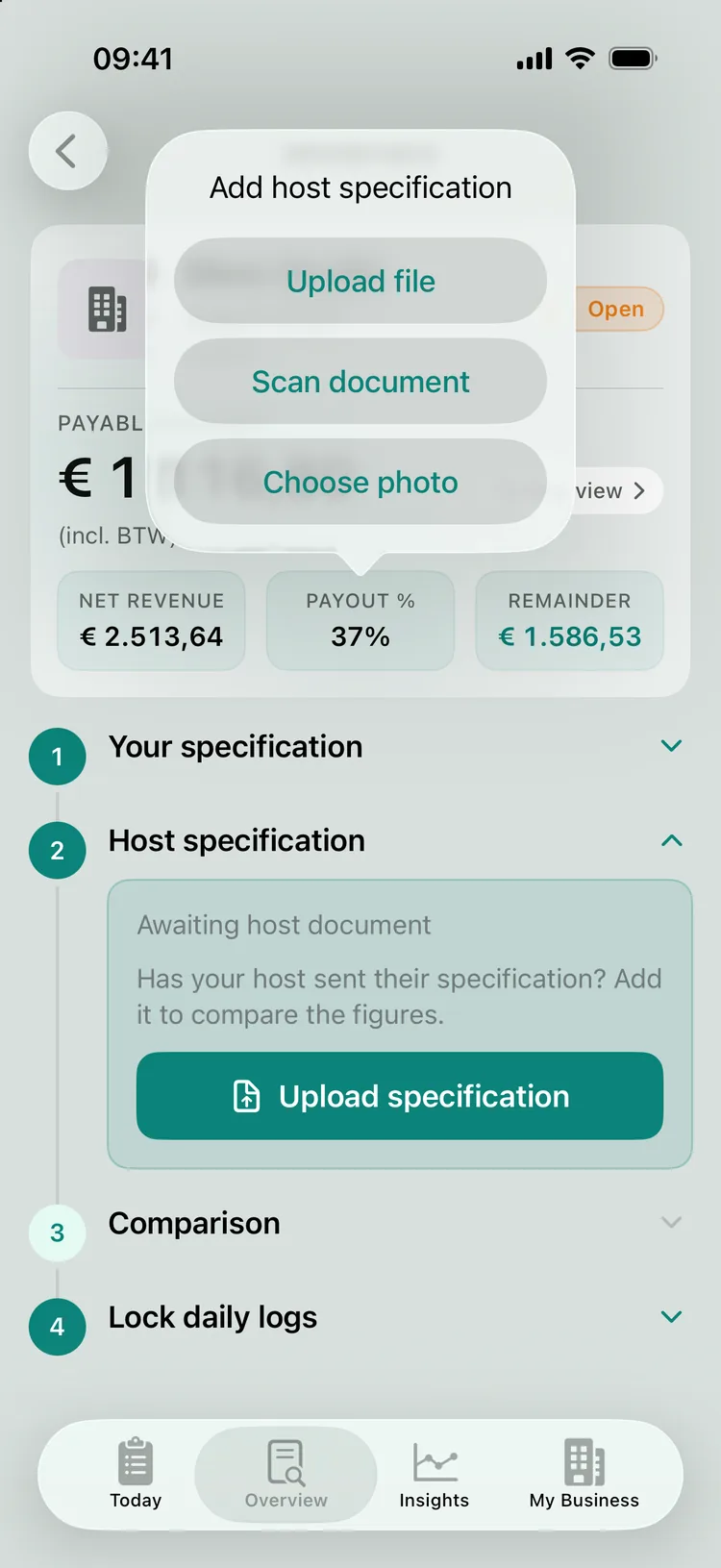
Add your host’s specification. Choose the host’s document or scan it with your camera. ZumFlo reads it straight away on your device and extracts the amounts and dates - before anything is compared.
You add the host’s specification - upload a file, scan it or choose a photo.
Start the comparison. ZumFlo compares your daily logs with the host’s specification. AI is used for that comparison - and this is the important part: client-specific data doesn’t leave your device. Only pseudonymised data (counts, amounts, dates) is used; client names and treatment details stay local and are only added to the report on your device after the comparison.
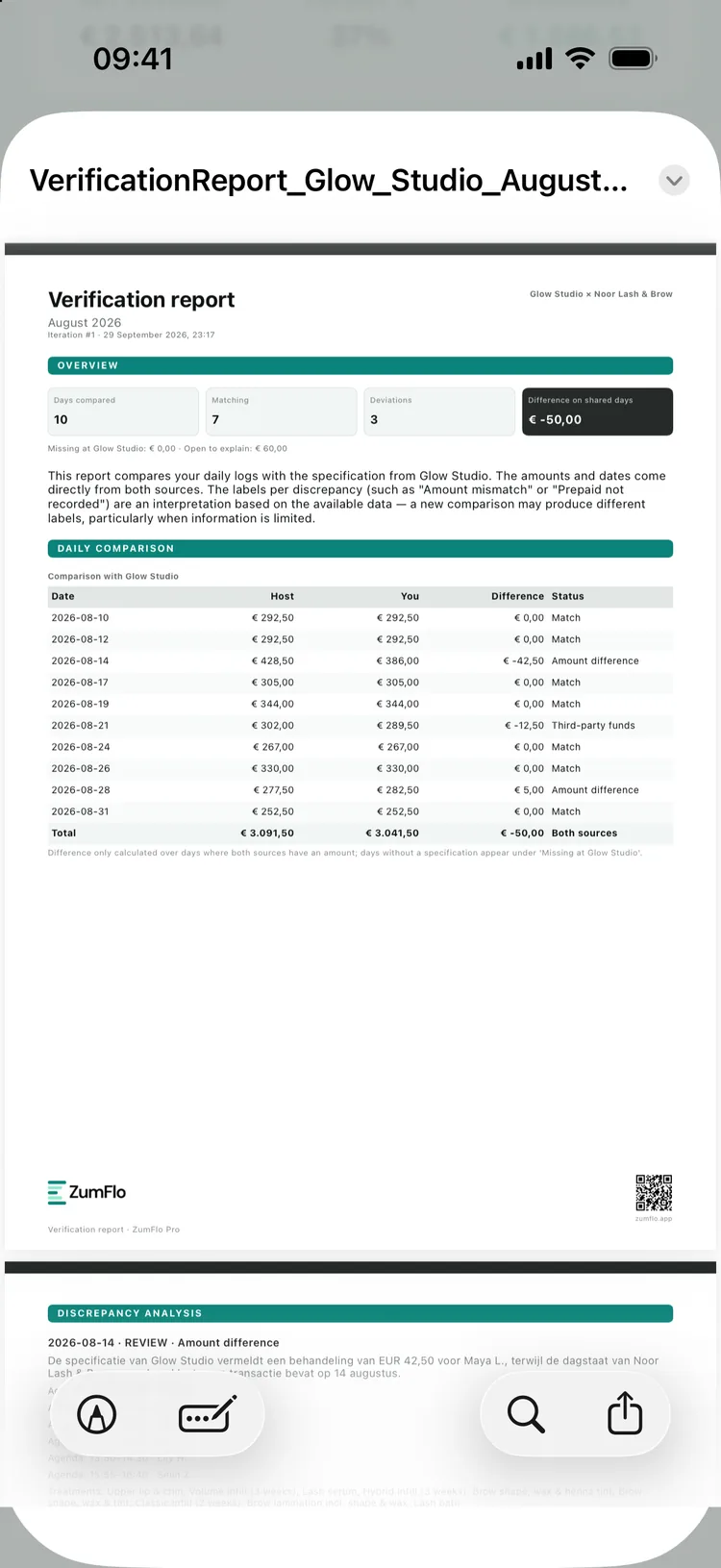
Review the outcome. You get a verification report: how many days match, where the discrepancies are and what the total difference is. A typical report reads, for example: ten days compared, seven match, three differ, total difference €50.00 - and for each discrepancy it shows what was recorded on both sides. The report is deliberately neutral: it names differences, it doesn’t assign blame. Often an explanation is included straight away - a prepaid treatment that hasn’t been entered as a voucher yet, or a tip that only counts on one side. That makes the report immediately useful as a basis for conversation, not an accusation.
Neutral and two-sided: it names differences, it doesn’t assign blame.
Step 4
Discuss and reach agreement
Go through the report with your host. Because it is two-sided and neutral, the conversation is about the facts: here one of you recorded this, there the other recorded that, this is the difference. If a discrepancy turns out to be valid - for example a forgotten entry on your side - you adjust your daily log and simply run the comparison again. The report then updates, with fewer or no discrepancies. In a few rounds you work towards figures you both stand behind.
Step 5
Close and lock
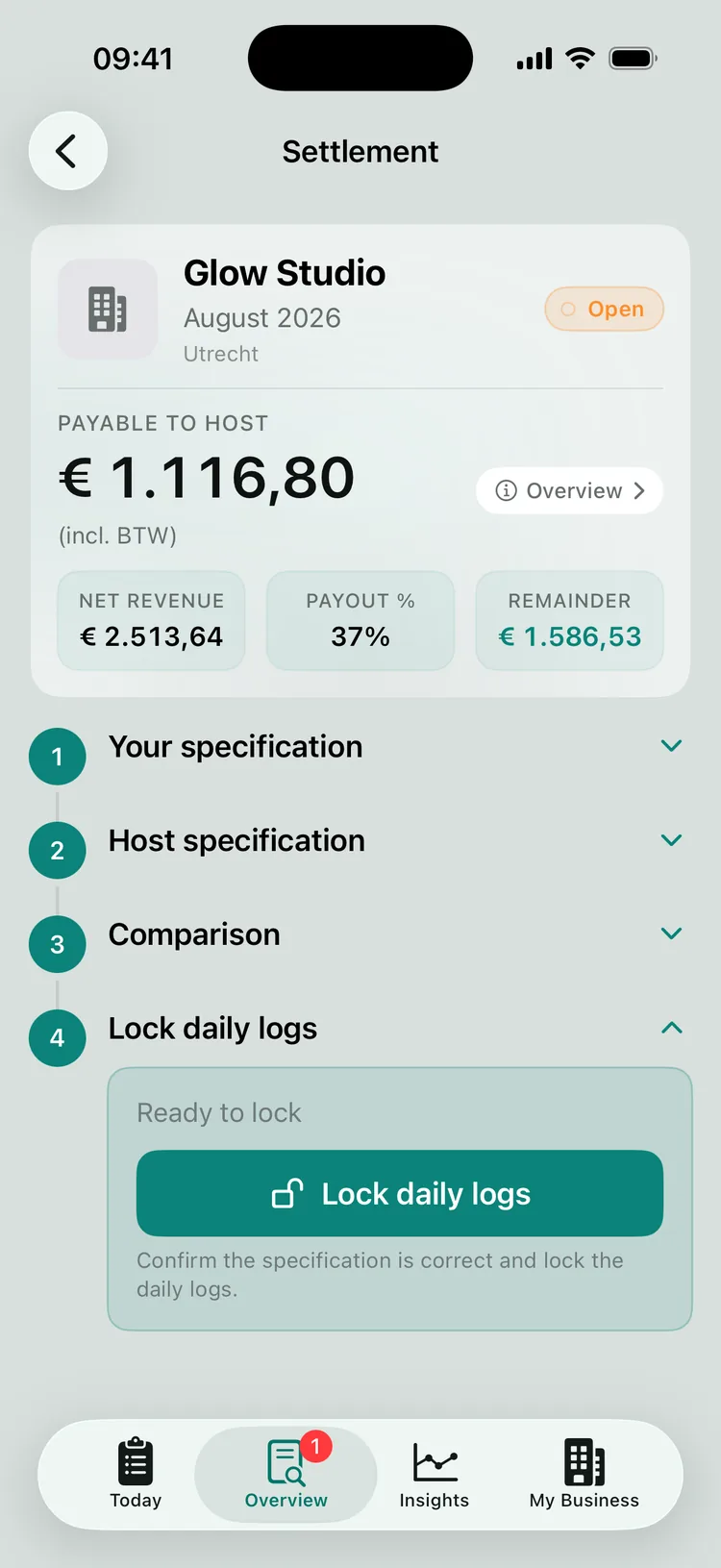
Once you agree, you close the month by locking the daily logs. That fixes the figures for that month, so a closed period can’t change by accident. It’s the confirmation that the month is final - for you, for your host and later for your accountant.
Locking fixes the figures for the month.
Locking is final: you can’t reopen a locked month in the app. So check your figures carefully before you lock - until then you can still reopen and adjust a closed day. If you find a difference after locking, you include it in the settlement of a later month, in consultation with your host. That way a closed month never changes again, and what you have already settled with your host and your bookkeeping stays accurate.
Step 6 PRO · optional
Book the closed month in Moneybird
Do you use Moneybird for your bookkeeping? Then, as a final step, you can have the closed settlement booked directly - revenue per BTW (Dutch VAT) rate, payment methods, costs and income, neatly broken down. That way your accountant doesn’t have to retype anything.
How to connect Moneybird, exactly what gets booked and what you still do in Moneybird itself to reconcile everything is covered in the separate guide: Connecting Moneybird and booking.
With that, your month is done. Want to look beyond the host - towards your own tax return and your accountant? Then each quarter you bundle your figures into an accountant’s file with your estimated BTW position (found under Insights → Fiscal). How that works is explained in quarter- and year-end closing.
And your client data?
The comparison was built with privacy as its starting point. Client names and treatment details don’t leave your device. Only pseudonymised data is used for the comparison itself - numbers, amounts and dates, without names. The enrichment with recognisable details (which treatment, which payment method) then happens entirely on your device, so the report is useful to you without that data ending up anywhere else. More on this in our privacy policy.
FAQ
Frequently asked questions about month-end closing
What is the purpose of the specification I share with my host?
Your period overview shows, per day and per location, what you did and how the settlement is built up - including what went outside the salon’s own system, such as cash, gift vouchers and discrepancies. That way you and your host can check the settlement item by item, instead of relying on a single set of records.
Does my client data leave my device during the AI comparison?
No. Only pseudonymised data is used for the comparison - counts, amounts and dates, without client names. Names and treatment details stay on your device and are only added to the report locally. Nothing that is sent contains information that identifies a client.
What happens when I lock a month?
Locking fixes the daily logs for that month, so the closed figures can’t change by accident. It is the confirmation that the month is final. You can’t reopen a locked month in the app. If a correction turns out to be needed later, you include it in the settlement of a later month, in consultation with your host.
Is the comparison with the host a Standard or a Pro feature?
Generating and sharing your own specification works with Standard. The AI comparison with the host’s specification (settlement check) and the Moneybird connection are part of Pro.
The settlement becomes a proper close.
No question mark at the end of the month, but a settlement that you and your host can check together - and that doubles as your own records.
ZumFlo builds your specification from your daily logs, compares it with the host (client data stays on your device), and books the closed month in Moneybird if you wish.